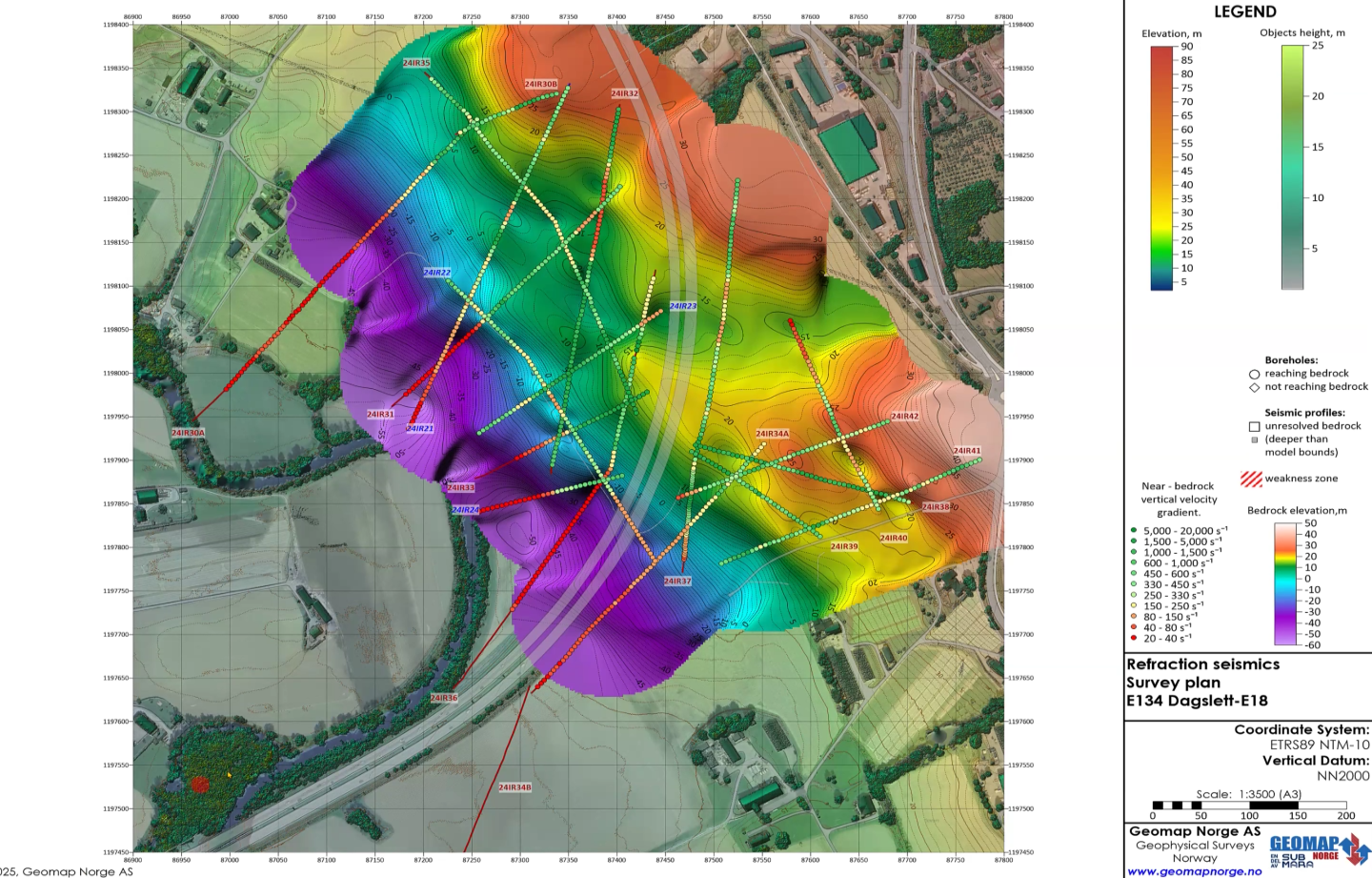
Interested in creating a cool map of snow depth for Colorado Ski Resorts? Here’s how to do it!

Create a 3D Surface Map using Snow Depth Data

First you’ll need to get the snow depth information from http://www.coloradoski.com/snow-report. Then type the names of the ski resorts into Google Maps and right click, selecting “What’s Here” to get the Lat/Lon coordinates of each. Type the latitudes and longitudes of each into Google Earth and record the elevation of each resort as well.

Next, in Surfer 10:

1. Open up a worksheet and put the label, latitude, longitude, snowfall mid-mtn depth, and elevation into separate columns. Save the worksheet as a .dat file.

2. Go to Grid | Data and select the .dat file you just created. Click Open. The Grid Data dialog box appears. Next to Z: in Data Columns select Column D: Snow Depth. Click the open folder button next to Output Grid File and give the output file a name like Snowfall.grd. Click Save.

3. Repeat step 2, using Column E: Elevation as the Z: and naming the file Elevation.grd.

4. Go to Map | New | Contour Map. Select the Snowfall.grd file you created in Step 2. Give the output file a name and click Save.

5. Click Map | Add | 3D Surface. Select the Elevation.grd file you created in Step 3. In the Property Manager click the Overlays tab and next to Color modulation select Use overlay color only from the dropdown menu. In the General tab set Lower under Material Color to 80% Black.

6. Click Map | Add | Post Layer... Select your .dat file and click Open. In the General tab of the Property Manager make sure X coordinate under Worksheet Columns is Column C: Lon and Y coordinate is Column B: Lat. In this tab you can also set the symbol to a snowflake.

7. Click the Labels tab of the Property Manager and set the Worksheet Column under Labels to Column A: Label.

8. Click on the Contour Map in the Object Manager and check the boxes next to Color Scale and Fill Contours in the General tab of the Property Manager.

9. Under the Levels tab click Grayscale next to Fill colors in the General section. Select Blues1 from the dropdown menu.

10. To add titles to the plot and the color scale go to Draw | Text.

It’s fun and easy to create multi-layered snow depth maps in Surfer 10!

Posted in Surfer, Uncategorized | Tagged , , | Leave a comment

In MapViewer every map boundary (area, curve, and point) can have a Primary ID, or PID. This PID serves as a link between the boundaries on your map and your map data in your worksheet. You can edit the Primary ID in the Property Inspector by selecting a map object either in the Plot Window or in the Object Manger.
Change your PID in MapViewer from Text to NumberIf you change your PID to a number from the Property Inspector MapViewer will treat it as text. This can be problematic if you want to order your map objects numerically, because MapViewer will read your number as text from left to right, and will order your objects as 1, 10, 11, 12, 13, etc., as opposed to 1, 2, 3, 4, 5, etc.
You can change the PID of you MapObjects to a number within the MapViewer Worksheet. Continue reading

Posted in Uncategorized | Leave a comment

You can convert your polylines from your DXF file to polygons using MapViewer. Follow along as I demonstrate how to convert polylines to polygons in MapViewer by downloading a sample DXF by clicking here.
Use MapViewer to Convert Your DXF Polylines to Polygons
Continue reading

Posted in MapViewer | Tagged , , | Leave a comment

One of the primary functions of a map is to display information visually. Color plays a crucial roll in the information sharing process. Choosing the “right” color for your map isn’t always easy, and certain colors and color combinations are better suited than others for displaying spatial patterns and outliers in your data. You can use ColorBrewer, a free web based diagnostic tool, to help aide in the color selection process.

Use ColorBrewer to Enhance the Visual Display of Your Map Continue reading

Posted in Grapher, MapViewer, Surfer, Uncategorized, Voxler | Tagged , | Leave a comment

It is often necessary to collect data at a regularly spaced interval. Often times the area of interest is within an irregularly shaped polygon. You can use both Surfer’s Gridding and Blanking functions to create a regularly spaced grid from boundary data, export the XY values to a data file, and then use a free online utility to convert the data file to GPX to load the XY data in your GPS. Continue reading

Posted in Surfer | Tagged , | Leave a comment

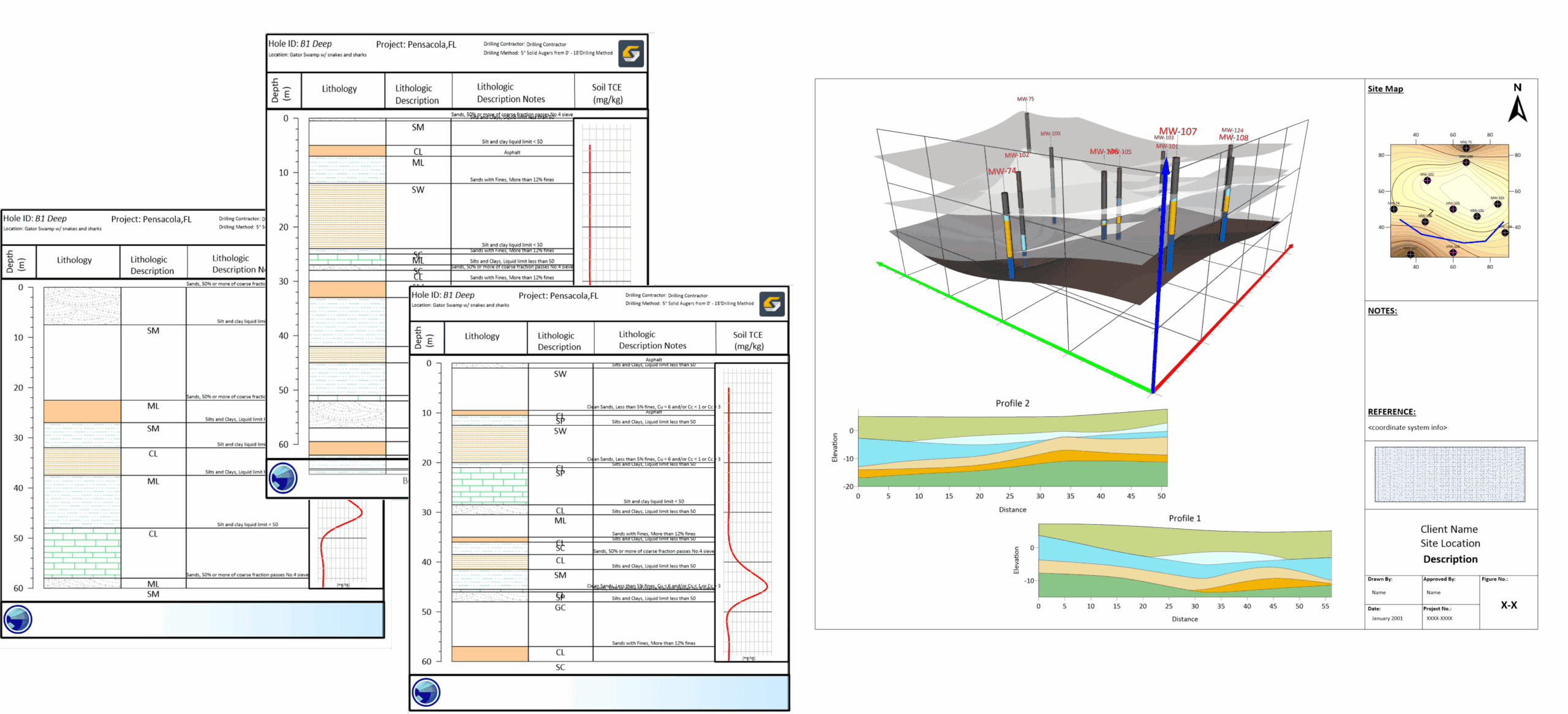
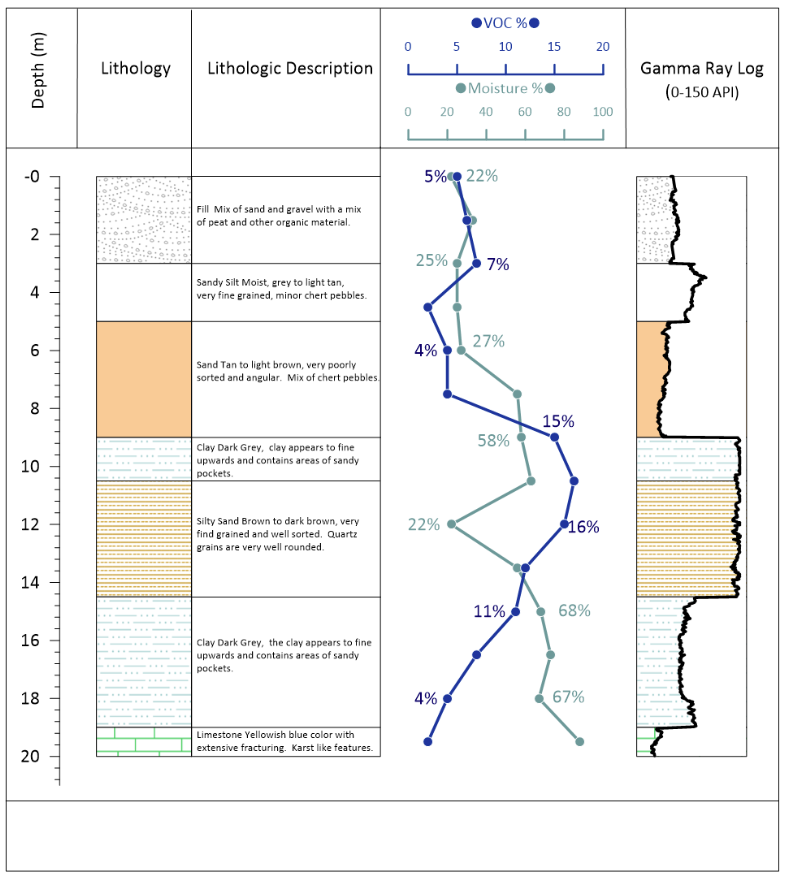
You can display your From – To interval data in Grapher as a Bar Chart using the steps outlined below. Our Strater application is specifically designed to graphically display this type of from – to interval data as a well log. You can click here to download a sample interval data file, and then follow along as I demonstrate how to modify the data using the To column by reversing the order in the Grapher worksheet so that the tallest bar (the deepest data value) is drawn first and the subsequent shorter bars (shallower values) are drawn over top of the preceding deeper ones.

  1. Unzip SampleIntervalData.zip and then open Grapher and from the toolbar select File | Open to open the SampleIntervalData.xls file in the Grpaher worksheet. Notice that the data is formatted as interval data.
    You Can Display Your Interval Data in Grapher as a Bar Chart
  2. Copy the To column, column C, and then open a new worksheet in Grapher by selecting File | New | Worksheet and paste the To column to column B.
  3. Next, select column B and from the toolbar select Data | Sort and select Descending. You can rename the column to Y if you like, as these depth values will serve as the Y values of our bar chart.
    You Can Display Your Interval Data in Grapher as a Bar Chart
  4. Now add an X value to column A to pair with the Y values in column B, I will use the number 5. You can also use column C as the Color Column. Your worksheet should look similar to the one below.
    You Can Display Your Interval Data in Grapher as a Bar Chart
  5. Select the plot tab and from the toolbar select Graph | 2D XY Graphs | Bar Chart and in the Open Worksheet dialog select the newly created worksheet.
  6. With the Bar Chart selected, in the Property Manager select the Fill tab and change the Color Column to Column C
    You Can Display Your Interval Data in Grapher as a Bar Chart
    You have now created a bar chart in Grahper from your interval data.
    You Can Display Your Interval Data in Grapher as a Bar Chart
Posted in Grapher, Strater | Tagged , | Leave a comment

In Surfer you can create a contour map from an XYZ data file. However, in some instances you may only want to display the contours within the boundary of your DXF base map. You can use Surfer to export your DXF base map as a BLN file, and then blank your contour grid file to limit the contours to the boundary of the DXF. You can follow along by downloading the zip file with the sample data by clicking here.

  1. Open Surfer and from the toolbar select Map | New | Base Map.
    Instructions on how to use your DXF files with Surfer 10
  2. In the Import dialog select and open the BuildingFloorPlan.dxf file. The floor plan should now appear in the plot window.
    Instructions on how to use your DXF files with Surfer 10
  3. Let’s add the elevation data file to our map as a Post Layer. With your Map selected in the Object Manager select Map | Add | Post Layer.
    Instructions on how to use your DXF files with Surfer 10
  4. In the Open Data dialog select and open the ZipLvlElePts.csv file. The elevation points should now display in the plot window.
    Instructions on how to use your DXF files with Surfer 10
  5. We will now grid the ZipLvlElePts.csv file so that we can create a contour map. From the toolbar select Grid | Data.
    Instructions on how to use your DXF files with Surfer 10
  6. In the Open Data dialog select and open the ZipLvlElePts.csv file.
  7. In the Grid Data dialog select the Change Filename icon and in the Save Grid As dialog choose your grid file name and the location of where you want to save the grid file, and then accept the remaining defaults in the Grid Data dialog and select OK.
    Use Your AutoCad DXF File to Limit Your Contour Layer to the DXF Boundary
  8. Back in the Surfer plot window with your Map selected in the Object Manager select Map | Add | Contour Layer and in the Open Grid dialog select and open your newly created GRD file.
    Instructions on how to use your DXF files with Surfer 10
  9. Our contour layer is added, however we would like to limit the contours to our floor plan. To do this we must export our DXF file as a BLN file. Uncheck all the axes, the contour layer, and the post layer and then select the base layer in the Object Manager. Then from the toolbar select File | Export and in the Export dialog ensure the Save as type is set to BLN Golden Software Blanking (*.bln), the Selected objects only and the Show options dialog  boxes are checked, and then name and save your file.
  10. In the Export Options dialog ensure that the Scaling source is set to Application and then select OK.
  11. Open up the newly created BLN file in the Surfer Worksheet and ensure that cell B1 is set to 0 (a 0 blanks outside the polygon, while a 1 blanks inside the polygon).
  12. Return back to the Surfer Plot window and from the toolbar select Grid | Blank and in the Open Grid dialog select your GRD file, in the Open dialog select your BLN file, and in the Save Grid As dialog name and save your newly blanked GRD file.
  13. Now let’s add our newly blanked GRD file by going Map | Add | Contour Layer from the toolbar and you will see our contour layer is now restricted to the boundary of our floor plans.
    Instructions on how to use your DXF files with Surfer 10
Posted in Surfer, Uncategorized | Leave a comment

You can open and display your Surfer 10 map project in Google Earth by exporting your Export your map to KML in Surfer 10 to use in Google Earth.map project from Surfer 10 to KML or KMZ file. Follow along as I demonstrate how to load a base layer and a contour layer in Surfer 10, export the map to KML, and then open the KML in Google Earth.

Exporting your map from Surfer 10 to Google Earth

  1. Open Surfer 10 and select Map | New | Base Map from the toolbar.
    Export your map to KML in Surfer 10 to use in Google Earth.
  2. In the Import dialog navigate to the Surfer 10 Samples folder and select and open Co2000.gsb.Export your map to KML in Surfer 10 to use in Google Earth.
  3. A base map of Colorado now appears in the plot window.
    Export your map to KML in Surfer 10 to use in Google Earth.
  4. Right click on Base in the Object Manager and select Add | Contour Layer.
    Export your map to KML in Surfer 10 to use in Google Earth.
  5. In the Open Grid dialog navigate to the Surfer 10 Samples folder and select and open Colorado.grd.
    Export your map to KML in Surfer 10 to use in Google Earth.
  6. If you receive a Surfer message select No.
  7. You have now added a contour layer to your Colorado map project.
    Export your map to KML in Surfer 10 to use in Google Earth.
  8. Now let’s add a fill the contours with a color scheme to liven our project up a bit! Select Contours in the Object Manager and then in the Property Manager select the General tab, and in the Filled Contours section check the box next to Fill Contours. Your contour layers are now filled with a gray scale color scheme.
    Export your map to KML in Surfer 10 to use in Google Earth.
  9. I think the gray scale is a bit dull for this project, so in the Property Manager select the Levels tab and in the General section click on the drop down window next to Fill Colors and select Terrain.
    Export your map to KML in Surfer 10 to use in Google Earth.
  10. In the Object Manager select Base and while holding the left mouse button move Base above Contours to display county boundary lines above the filled contours.Export your map to KML in Surfer 10 to use in Google Earth.
  11. With Base still selected in the Object Manager, in the Property Manager on the Base Map tab in the Properties section, expand Line Properties and change the Width to 0.020 in.
    Export your map to KML in Surfer 10 to use in Google Earth.
  12. Select the Coordinate System tab and notice that the base layer is in WGS 1984, Unprojected Lat/Long.
    Export your map to KML in Surfer 10 to use in Google Earth.
  13. Select the contour layer and the Map in the Object Manager and notice that the coordinate systems are all identical.
  14. Uncheck all the axes in the Object Manager and then select Map.
    Export your map to KML in Surfer 10 to use in Google Earth.
  15. From the toolbar select File | Export.
    Export your map to KML in Surfer 10 to use in Google Earth.
  16. In the Export dialog choose a file location, file name, change the Save as type to KML, ensure that both Selected objects only and Show options dialog boxes are checked and then select Save.
    Export your map to KML in Surfer 10 to use in Google Earth.
  17. In the Export Options dialog on the Scaling tab ensure that all your settings are identical to mine.
    Export your map to KML in Surfer 10 to use in Google Earth.
  18. On the Spatial References tab ensure that all your settings are identical to mine.
    Export your map to KML in Surfer 10 to use in Google Earth.
  19. And on the KML Options tab ensure that all your settings are identical to mine, and then select OK.
    Export your map to KML in Surfer 10 to use in Google Earth.
  20. Now open Google Earth and from the toolbar select File | Open and in the Open  dialog navigate to, select, and open your KML file.
    Export your map to KML in Surfer 10 to use in Google Earth.
  21. You should now see your Colorado map project displayed in the correct coordinate space in Google Earth.
    Export your map to KML in Surfer 10 to use in Google Earth.

Using the KML/KMZ export in Surfer 10 allows you to share your map project with any audience that has access to Google Earth.

Posted in Surfer, Uncategorized | Leave a comment

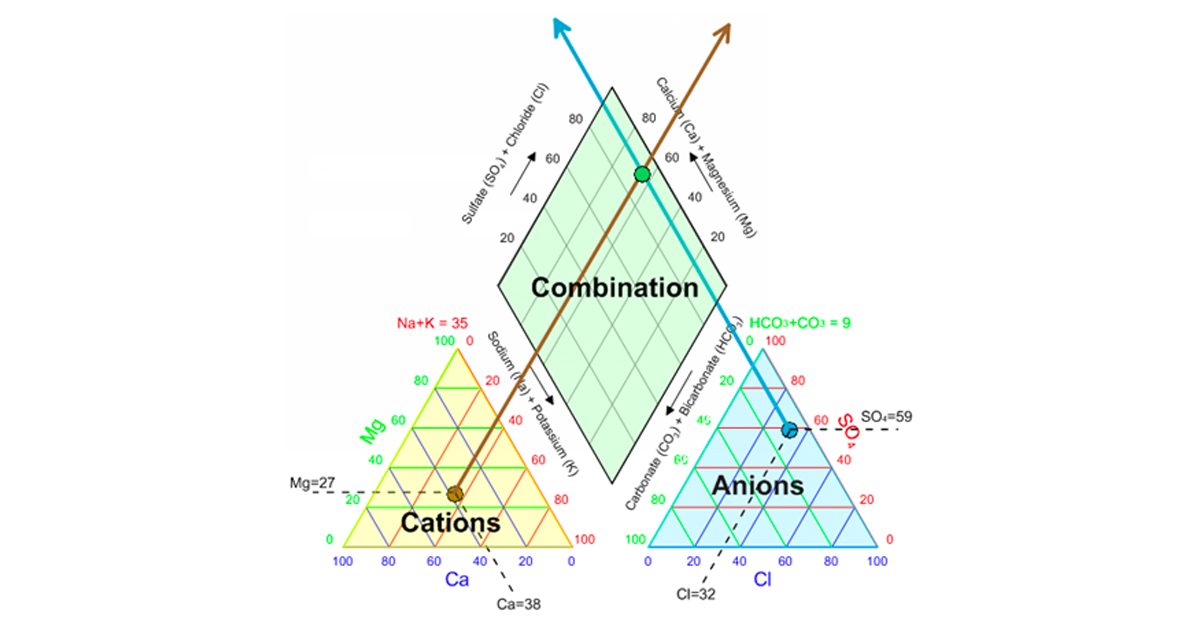
To create Piper plot with Grapher 9 check out the Knowledge Base article,Use Grapher 9 to create a Piper Plot Can Grapher create a Piper plot? If so, how?, to download a sample Piper plot, or you can download it by clicking here. Use the sample piper-graphs.grf file and the included piper for grapher.dat worksheet as a guide. You will first want to setup your data worksheet so that it is configured in the same manner as the piper for grapher.dat worksheet. Then open the piper-graphs.grf file in Grapher 9, select each of the ternary plots in the Object Manager and then in the Property Manager on the Plot tab click the drop-down window next to Worksheet to choose your data worksheet.

Use Grapher 9 to create a Piper Plot  Use Grapher 9 to create a Piper Plot

Posted in Grapher | Tagged | Leave a comment

Surfer 10 does not support Lidar LAS format, however you can use LASUtility, an LAS converter, to convert a LAS file to an XYZ file.LAS converter to XYZ

Be prepared for a timely conversion as LAS files are very dense files that contain millions of data values. Once the file is converted to an XYZ data file, you can use it in Surfer!

Posted in Surfer | Tagged , , , | Leave a comment