How Better Project Documentation Makes You a More Effective Geoscientist
In geoscience, most professionals are laser-focused on data collection, analysis, and delivering high-quality final outputs, which means project documentation often falls to the bottom of the priority list. But weak documentation creates friction in every part of a workflow. When assumptions, decisions, and methods aren’t clearly recorded, even the most straightforward visuals become harder to reuse, update, collaborate on, or defend later.
That’s why strong project documentation is more than a formality. It’s a professional skill that helps geoscientists work faster, avoid unnecessary rework, collaborate more effectively, and have more productive conversations with stakeholders. But how can you strengthen your documentation in a way that genuinely improves your workflow? Let’s dive in to unpack the answer.
What Project Documentation Means in Geoscience
First, let’s get clear on what project documentation actually means in geoscience. Simply put, it’s the collection of notes, decisions, and records that explain how and why a project was created in the first place.
Strong documentation captures the context behind your workflow, providing the narrative that connects the dots between raw data and final output so your work can be reused, updated, collaborated on, or defended later. It answers key questions, including:
- Why did you choose a specific map, model, or graph?
- How did you handle outliers?
- What assumptions guided your design?
- Which datasets were included or excluded?
- What was your thought process behind key decisions?
- What customizations did you make to your visualization?
Just as important, project documentation doesn’t live in just one place. It can appear inside your project files, in clearly named folders, in notes attached to models or maps, or in supplemental materials that track methods and version history. Regardless of the format, the function is the same: preserving context for your workflow so it’s easy to reuse, update, collaborate on, or defend your work.
When you achieve that goal, your project becomes durable. If the project evolves, new data arrives, a team member wants to collaborate, or stakeholders ask questions, you aren’t forced to reconstruct your workflow from memory. Instead, you have a clear record that keeps the project moving forward smoothly.
What Happens When Documentation Is Weak? The Real Costs
Now, what happens when you don’t have strong project documentation? We’ve hinted at it already, but let’s discuss the consequences more plainly. Here’s the friction you’ll experience in your workflow when your project documentation isn’t strong.
Design Decisions Have No Explanation
One of the biggest problems with weak documentation is lost context. When the reasoning behind your choices isn’t recorded, future you—or anyone else touching the project—has no way of understanding why certain decisions were made. This can show up in a few ways:
- No notes explaining how a visualization was designed or how it should be updated.
- Missing justification for customization choices around color scales, symbology, filters, or gridding settings.
- No record of parameters you tested and discarded, which makes it easy to repeat mistakes.
Without this context, even a polished graph, map, or model becomes difficult to reuse, update, collaborate on, or defend. The “what” is visible, but the “why” is lost, and that part matters when making data visualizations.
More Time Is Wasted
When your documentation is weak, the next phase of the project—like updating your visual with new data—often requires retracing your own steps instead of building on prior work. That slows momentum and forces you to investigate rather than focus on analysis. When that happens, three consequences appear:
- You spend too much time trying to remember how you produced a map, model, or graph.
- Recreating workflows becomes guesswork instead of straightforward execution.
- Long pauses between project stages lead to unnecessary restarts because the original process wasn’t documented.
Over the course of a project—or an entire career—these inefficiencies add up to hours of avoidable rework.
Collaboration Becomes Harder
Geoscience is collaborative by nature, but poor documentation makes it harder for teams to work together effectively. When teammates can’t follow your process, collaboration slows and feedback becomes less actionable. You’ll start to notice that:
- Colleagues struggle to understand how results were generated or what assumptions were used.
- Reviews take longer because they require extra explanations.
- Decision-making is delayed by repeated clarification cycles.
Weak documentation creates barriers where there should be alignment, and that affects project timelines as well as project quality.
Defensibility and Traceability Are Compromised
In technical and regulated industries, your work must be able to stand on its own. Without clear documentation, you lose the “paper trail” that connects your raw data to your final conclusions. This creates a two-fold risk:
- Increased Misinterpretation: When workflows, assumptions, and datasets aren’t explicitly recorded, stakeholders are forced to guess. This leads to misread results, incorrect decisions, and a breakdown in trust between you and your audience.
- Vanishing Accountability: If a regulator or client challenges a specific model or map, you must be able to show exactly how you got there. Weak documentation leaves you unable to justify your parameters or symbology, making your conclusions difficult to defend under scrutiny.
Ultimately, documentation is your professional insurance policy. Without it, even the most accurate analysis can be dismissed if it can’t be traced and verified.
Practical Best Practices for Creating Strong Project Documentation
So how can you build project documentation that makes it easy for you to reuse, update, collaborate on, or defend? Below are essential best practices that can help you document projects efficiently while improving long-term workflow quality.
1. Use Clear, Consistent File and Project Naming
Strong documentation starts with your digital file names. Clear naming conventions help you and others instantly identify the latest version, the correct dataset, or the appropriate visual without digging through folders or opening multiple files. Consequently, it prevents confusion and speeds up workflow transitions.
For a concise, standardized naming structure, consider including:
- Project or site name
- Date or sampling round
- Version number or milestone
This simple practice will eliminate ambiguity and ensure the right file is always easy to find.
2. Capture Decisions in Context Using In-Document Comments
One of the biggest challenges in long-term or seasonal projects is remembering exactly how you built a visual or the settings you used. The same problem arises when handing a project to a colleague who must decipher your filters, styling choices, or workflow from scratch.
You can solve this by leaving comments explaining the reasoning behind your choices inside the project file itself. These embedded notes will preserve the context behind your work, so you never have to retrace your steps, rely on memory months later, or create confusion among team members.
Consider creating comments to record:
- Why a specific filter or setting was chosen
- What a color scheme, axis range, or symbol style is meant to highlight
- Instructions for collaborators on what to review, adjust, or replicate
- Assumptions, limitations, or considerations for future updates
When comments live in the same document as the visualization, nothing gets lost—and both you and your team work faster.
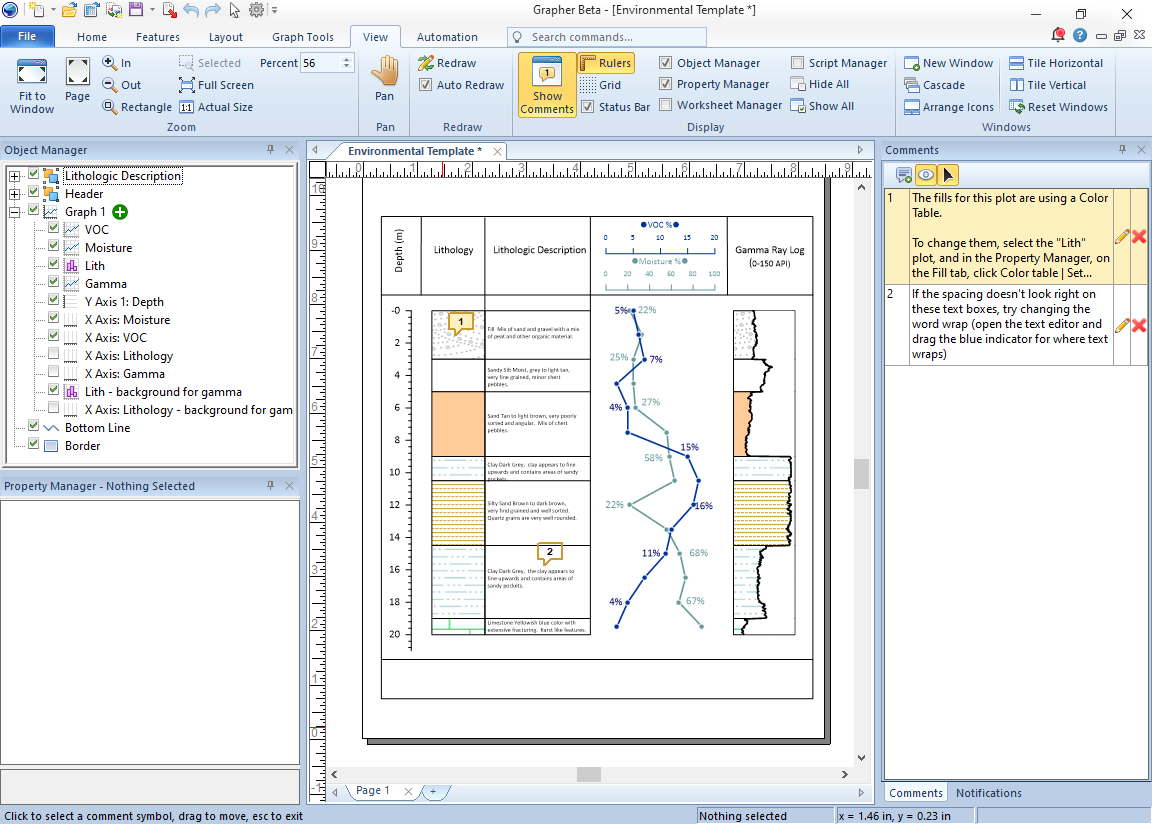
Tech Tip: You can start leaving notes on your graphing files using Grapher’s new feature, Document Comments! You can write notes about everything from key design decisions to instructions on how to repeat your workflow. The comments will stay in the file, so you or teammates can reference them weeks, months, or years later.
3. Track Versions Intentionally
Good version tracking prevents accidental overwrites, supports defensibility, and captures the evolution of your project. That said, instead of constantly overwriting files, save milestone versions as the project progresses. Each version will become its own snapshot, which can be useful for audits, regulatory review, team collaboration, or retracing earlier conclusions.
When tracking versions, helpful things to add include:
- Brief notes on what changed and why
- Distinct version numbers (v1, v2, v3) aligned with project checkpoints
Ultimately, intentional versioning reduces confusion and preserves a clean historical record.
4. Maintain a Simple Project Overview
A project overview acts as a roadmap for anyone who opens a file, including you if you open an old document months later. The short summary will provide essential context without requiring a deep dive into the full workflow.
A strong overview typically includes:
- Project goals or questions being answered
- Primary datasets used
- Current status or progress
- Any unresolved questions or known limitations
This quick reference will dramatically reduce onboarding time when either reopening a project after significant time has passed or handing it off to a colleague midstream.
5. Document Data Sources and Metadata
Data rarely speaks for itself. Recording details about where it came from, how it was processed, and its limitations makes your work transparent and repeatable. This is essential during QA/QC, regulatory reporting, peer review, or collaboration with technical teams.
Key metadata you should capture includes:
- Data source, collection date, and sampling method
- Coordinate systems and units
- Processing steps, filters, or transformations applied
- Known limitations or uncertainty
When metadata is clear, the credibility and defensibility of your work increase significantly.
6. Keep Assumptions and Limitations Explicit
All geoscientific interpretation involves assumptions. Failing to document them can lead to misinterpretation, miscommunication, or incorrect decisions down the road. So, writing down the why behind your decisions acknowledges uncertainty while strengthening trust in your outputs.
Here are examples of assumptions to share:
- Reasoning behind boundary interpretations
- Areas of uncertainty or sparse data
- Conditions you assumed to be constant
Clear assumptions enable clearer conversations with stakeholders and smoother technical review.
7. Align Documentation With Project Milestones
Documentation is easiest and most accurate when added gradually—not saved for the end of a project. Natural checkpoints such as sampling rounds, analysis, internal reviews, or draft-report stages are ideal moments to update notes. Providing context at each major milestone keeps documentation fresh and accurate.
8. Centralize Project Information
Documentation loses value when it’s scattered across personal folders, email attachments, and chat messages. Centralizing your data, notes, and outputs ensures everyone has access to the same information. Consider using a shared and consistent structure (team drive, SharePoint, secure cloud folder, etc.) to keep project knowledge accessible and prevent critical context from disappearing.
9. Standardize Documentation Where Possible
Consistency is one of the most powerful documentation tools. Standardizing your approach to naming, note-taking, summaries, data visualization, and version tracking removes friction and makes it easier to switch between projects and get up to speed. One easy way you can start standardizing documentation is to create checklists or standard operating procedures (SOPs) for everyone to follow.
10. Review Documentation Before Final Deliverables
Before submitting a report, exporting visuals, or delivering results, take a moment to ensure your documentation reflects the current project state. This final review reduces last-minute confusion and protects your work from avoidable questions during stakeholder review.
During the review, confirm the following:
- Decisions and assumptions are clearly recorded
- Metadata is complete
- Version notes reflect the latest file
- Instructions for future updates are accurate
This final check strengthens both the clarity and defensibility of your results.
The Benefits of Strong Project Documentation
Now, what can you expect to gain by putting these project documentation habits into practice? The impact is bigger—and more immediate—than you may initially think. Here are some advantages you’ll start noticing right away.
Faster Project Restarts With Less Frustration
When documentation preserves the “why” behind your decisions, picking a project back up becomes far easier. Instead of spending hours retracing your steps or reverse-engineering old settings, you can quickly reorient yourself and resume progress with confidence. This is especially valuable for seasonal work, long-running studies, or projects with lengthy pauses between phases. Clear documentation shortens the ramp-up time and gets you back to productive work sooner.
Clearer Collaboration and More Productive Feedback
Good documentation eliminates the guesswork that often slows collaboration. When teammates can clearly see your assumptions, decisions, and workflows, they don’t have to interpret your process; they can just build on it. This leads to faster reviews, sharper feedback, and fewer back-and-forth clarification cycles. Whether you’re working across departments or handing a project to a colleague, strong documentation keeps everyone aligned.
Greater Confidence When Explaining Results
When you document the reasoning behind your maps, models, and graphs, explaining results becomes easier and far more defensible. You can clearly articulate how an output was generated, why certain parameters were chosen, and what assumptions guided the analysis. That transparency strengthens trust with clients, regulators, project managers, and internal reviewers alike. It also reduces repetitive questions and skepticism during presentations or reporting.

Higher-Quality Final Deliverables
When comments, assumptions, limitations, and workflow notes are captured along the way, errors are less likely to slip into final outputs. Good documentation serves as a built-in QA/QC tool, helping you spot inconsistencies earlier and produce cleaner, more accurate maps, models, and graphs.
Improved Knowledge Retention Across Your Organization
Strong documentation not only helps the current project team but also strengthens institutional knowledge. Processes, lessons learned, and repeatable workflows become easier to preserve, share, and scale across other projects or departments. Over time, this builds a more efficient, informed, and capable team.
Document Smarter, Work Faster
Project documentation shouldn’t be a low priority. It’s one of the most practical ways to become a more effective, efficient, and trusted geoscientist. When your decisions, assumptions, and methods are clearly captured, every part of your workflow becomes easier. You can reuse, update, collaborate on, and defend your outputs with confidence and clarity.
Even better? You don’t have to jump through hoops to start documenting projects well. You can begin with one of the simplest, highest-impact tools available: Grapher’s Document Comments. By recording notes directly inside your project file, you preserve the context that future-you—and your colleagues—need to work quickly and accurately. Want to try it for yourself! Download a free 14-day trial of Grapher and start incorporating strong project documentation into your workflow!
FAQ: Project Documentation
Was this helpful?
Share This Article:
Leave A Comment
Recent Articles
- Mar 25, 2026|Gabbie Rhodes|10 min
Stacked bar charts are one of those visuals that everyone recognizes but doesn’t always use to their full potential. Discover how to use it effectively.
- Mar 25, 2026|Gabbie Rhodes|11 min
One of the most common choices in scientific data visualization is deciding between a log scale vs. linear scale. Here's how to choose wisely.
- Mar 20, 2026|Gabbie Rhodes|6 min
In a recent webinar, Drew Dudley showed how to transform raw borehole data into polished 2D borehole logs and 3D models.
- Mar 20, 2026|Gabbie Rhodes|9 min
Behind many landmark discoveries are historical women in geosciences. Discover the women who helped lay the groundwork for modern research.