Meet the Latest Version of Surfer: Designed for Clarity, Built for Efficiency
A new version of Surfer is here, and it’s packed with tools to enhance your 3D models, streamline tasks between platforms, and improve your communication with stakeholders. From clearly showcasing subsurface layers to quickly importing a DWG file, the features in this latest Surfer update are primed to make your maps and models better, easier to create, and more intuitive to stakeholders.
“For this version of Surfer, we focused on adding features like contact surfaces and video recording in the 3D View so users can communicate their data more effectively to stakeholders,” said Surfer Product Manager Kari Dickenson. “We also developed tools to streamline users’ workflow—including the ability to easily export and import DWG files and separate layer options—so they can complete their visuals faster.”
These aren’t the only new features you can enjoy. This release introduces a suite of powerful updates. To give you a closer look at what’s available, here are the top new additions to Surfer.
Better Subsurface 3D Modeling
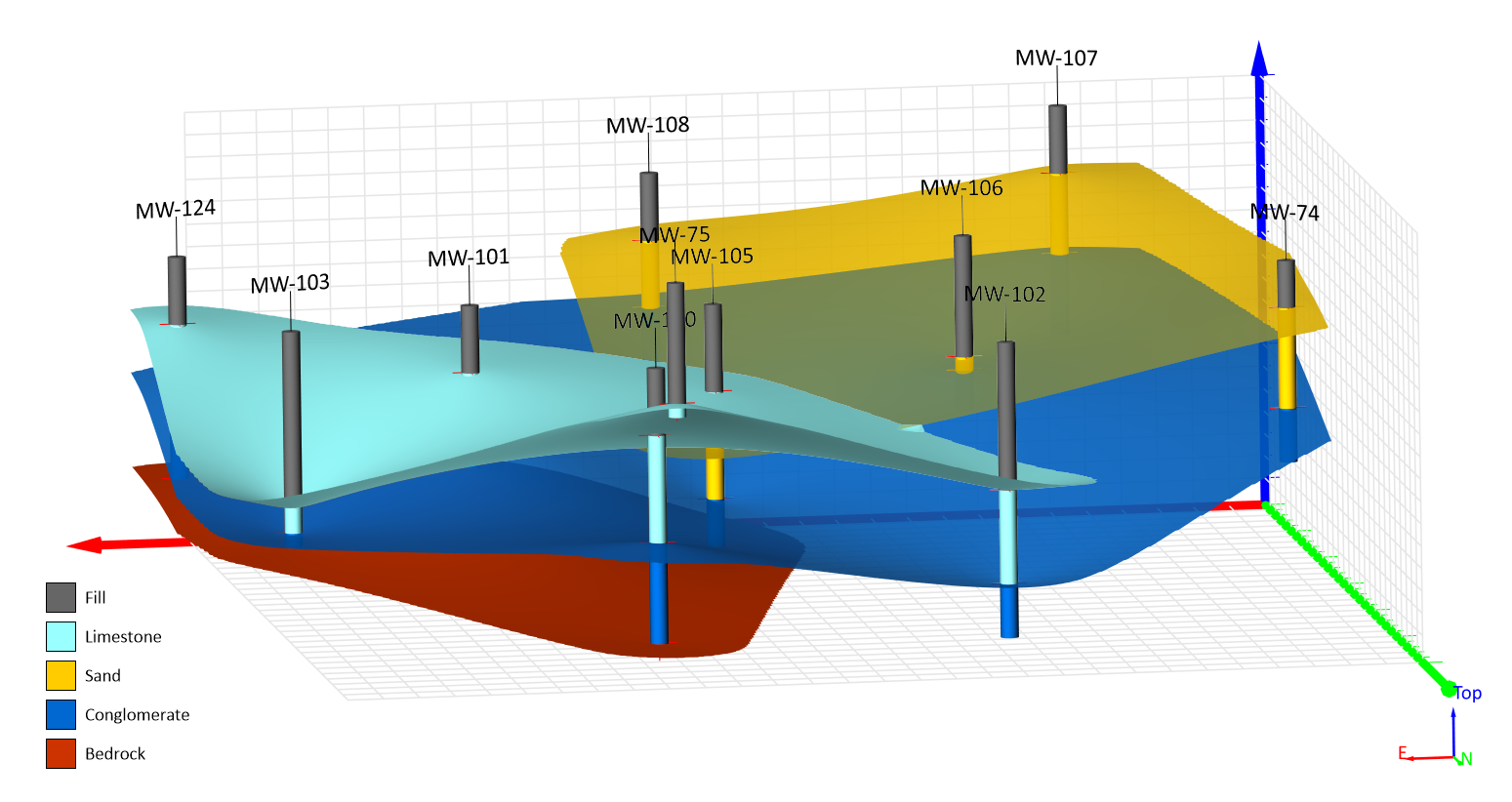
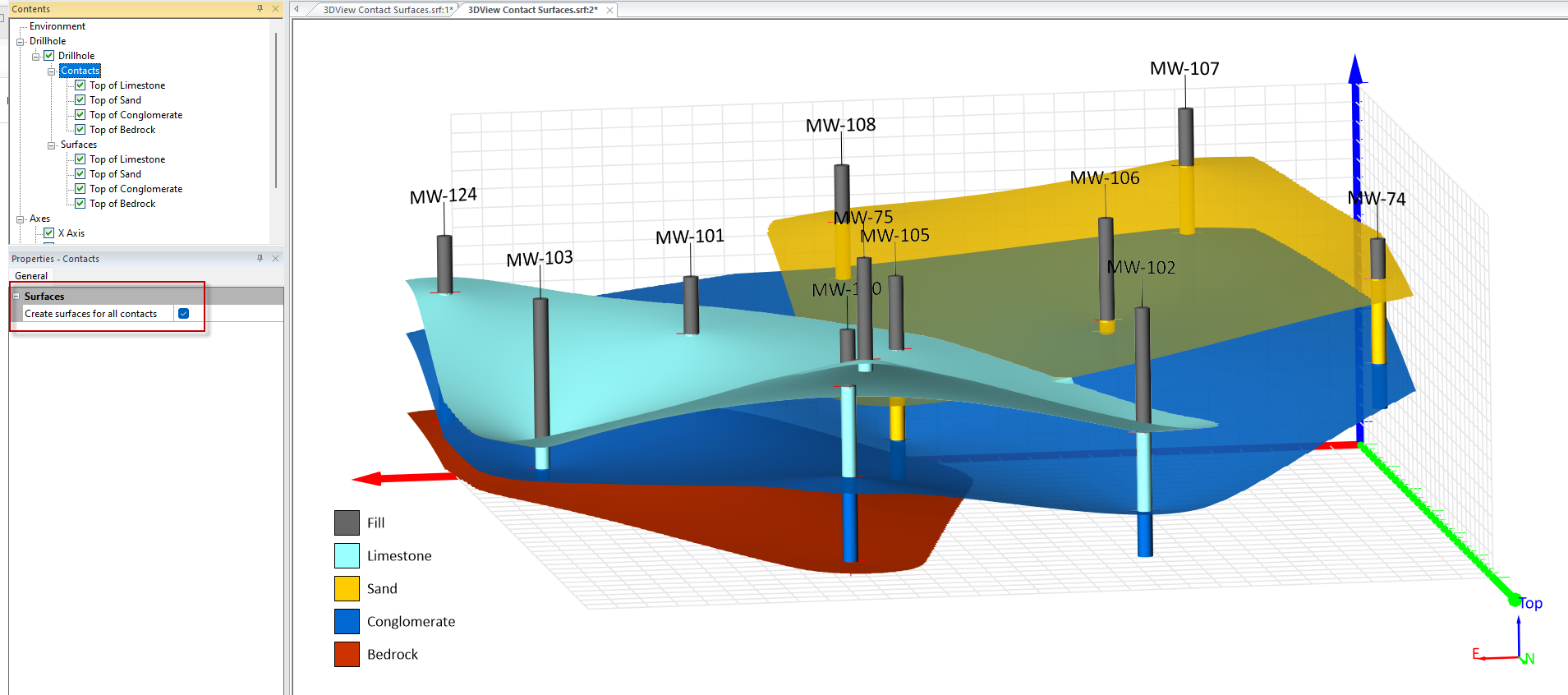
Contact Surfaces from Drillhole Data
One of the most impactful additions to this Surfer release is the introduction of contact surfaces, a feature that makes interpreting and modeling the subsurface clearer and far more intuitive. If you work with drillhole data, this update is especially meaningful.
Contact surfaces equip you to automatically connect matching lithologies or horizons between drillholes, transforming scattered intervals into continuous 3D surfaces. Instead of manually inferring where a layer begins, ends, or changes elevation, Surfer now helps you visualize those boundaries directly, giving you and stakeholders a more complete understanding of what’s happening underground.
With contact surfaces, you can:
- Define and interpolate key geological contacts (e.g., the top and bottom of a coal seam, aquifer boundary, mineralized zone, or confining layer).
- Generate upper and lower surfaces for any material of interest and save them as grids.
- Perform calculations like volume estimates by pairing your surfaces with Surfer’s Grid Volume tool.
Take this example: perhaps you’re working with a series of drillholes that intersect a coal seam. With this new tool, you can mark the seam’s upper and lower contacts, create surfaces from those picks, and then instantly calculate the seam’s total volume to get a clean, continuous model that helps you quantify resources with confidence.
Create a 3D View Image Along a Polyline
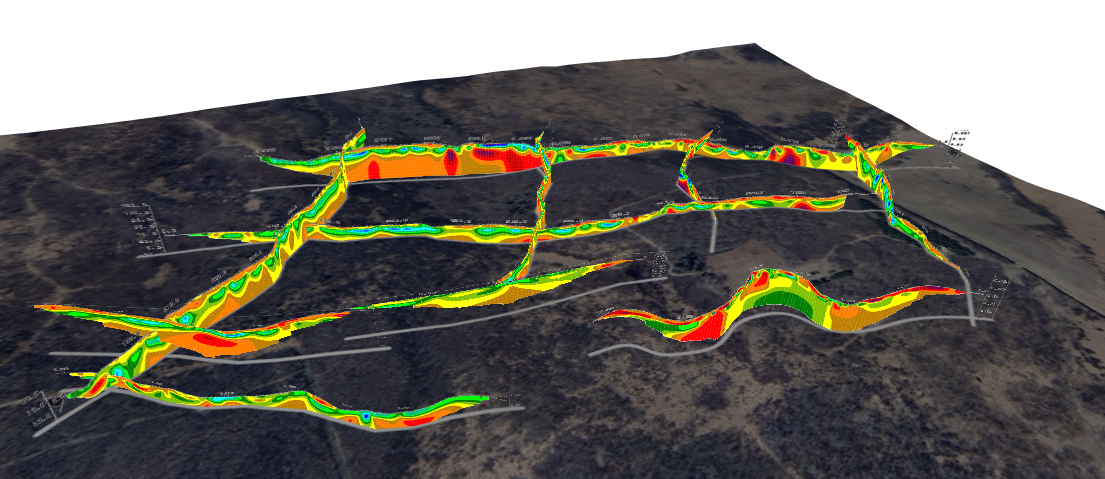
Surfer’s new 3D View Image Along a Polyline makes it easy to select any polyline or polygon from a base layer and use it as the spatial reference for an image. Surfer handles the placement, alignment, and orientation automatically, even when the path curves or cuts across the model at an angle.
What does this mean for your workflow? There are two big benefits:
- Non-linear cross-sections, curving trenches, or angled profiles snap into place instantly.
- Batch placement becomes far easier, which is ideal when working with multiple slices or datasets.
The result? You save significant time, avoid alignment errors, and get the clean, accurate 3D profiles you intended without any challenges.
Effective Integration with CAD Modeling
DWG Import, Export, and Open
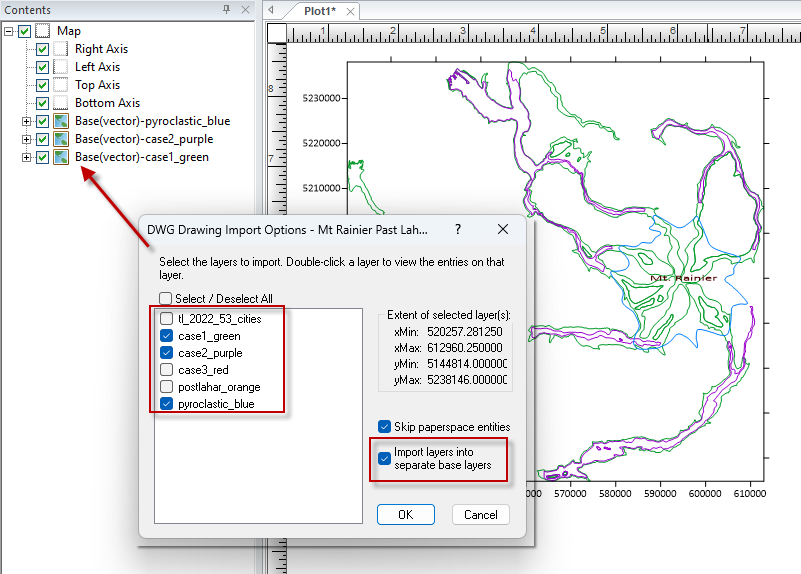
For many geoscience and engineering projects, CAD files are a central part of the workflow. With this release, Surfer now supports DWG import and export, giving you a smooth, reliable bridge between Surfer and CAD environments. You can bring DWG files straight into Surfer without conversion steps, preserving geometry, structure, and symbology with far greater fidelity. And when your work is ready to share, you can export your updated or newly created layers back to DWG.
The impact on your workflow is significant. This seamless integration means you don’t have to convert formats or risk errors introduced during third-party conversions. Instead, you get faster collaboration across platforms and a smoother path from analysis to design.
Export 3D Geometry Directly From the 2D Plot View
For many 3D workflows, you need to accurately reuse 3D surfaces and structures in Surfer or CAD environments. Today, Surfer equips you to export 3D geometry directly from the 2D plot view to DXF or DWG while retaining all elevation (Z) data. That means every ridge, valley, horizon, and modeled surface stays fully three-dimensional the moment it leaves the 2D View.
Why this matters for your workflow:
- Your exported files remain true 3D objects—no flattening or no manual reconstruction.
- CAD users and engineering teams receive geometry that behaves exactly as expected.
- You eliminate error-prone rework and accelerate cross-platform collaboration.
In other words, your 3D data stays 3D, even when you export it from 2D. This upgrade empowers you to transfer surfaces, models, and structural interpretations seamlessly between Surfer and external tools, ensuring accuracy, protecting data integrity, and keeping your workflow moving forward without interruption.
Enhanced Communication With Stakeholders
3D View Video Recording
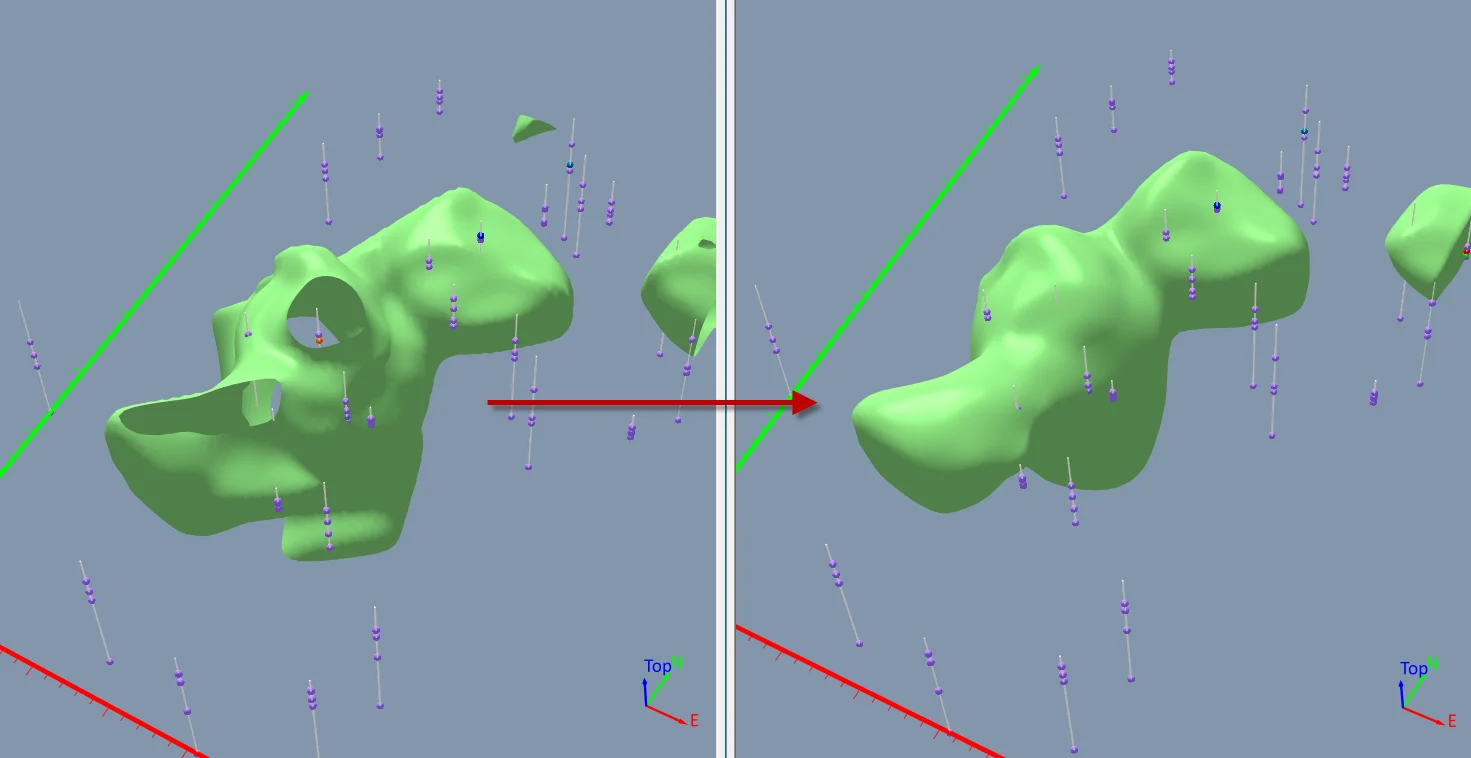
Surfer’s new 3D View video recording feature is a game-changer for anyone who needs to communicate complex 3D models clearly and confidently. You can now record a smooth, high-quality MP4 video directly from the 3D View that captures exactly what you want others to see. Whether you’re rotating a surface, highlighting a contact boundary, or zooming into an area of concern, Surfer records it frame by frame.
This feature is especially valuable when:
- Clients struggle to interpret 3D PDFs
- Static images fail to show key spatial relationships
- You need to guide someone’s attention to the right location in the model
Ultimately, with video recording in the 3D View, your models look their best, your message comes through clearly, and stakeholders see your data the way you intended. The result? Clearer communication that leads to more informed decision-making.
Smarter, Clearer Legends in Surfer
Clear communication is not only about the map but also the legend that explains it. In this release, Surfer introduces a series of legend improvements that will help you present your data with more clarity. Below are the main updates.
- Add Drillholes to the Legend Without Symbology: Now, Surfer automatically includes drillhole symbols in your legend, even when those drillholes don’t have assigned symbology. The benefit is that stakeholders immediately understand what the drillhole markers represent.
- Automatically Create Contour Entries in Your Legend: Contour layers are an essential part of many geological, hydrological, and environmental maps. With this update, Surfer can automatically generate contour legend entries, leading to clearer communication.
- More Intuitive Pie Chart Legends: When you’re using pie chart fills, Surfer now shows a boundary line around each pie-slice sample in the legend. This small but meaningful visual enhancement helps viewers immediately connect the legend slices to what they see on the map.
- Templates With Layer Name Directive Support: Legends now support layer name directives across multiple symbology types, including base classed and unclassed symbol and color symbology, base unique values symbology, and post layers. This means a single sample—or even a single drillhole—can automatically use its layer name (e.g., “Sample Locations”) as its legend entry. This results in descriptive, informative legend text, ensuring your maps become easier to interpret.
The main point? Whether you’re mapping drillholes, contours, pie charts, or post data, your legends can now explain your visuals more effectively and with far less effort.
Start Using the Latest Version of Surfer Today
The latest version of Surfer brings together powerful new features that make it easier to communicate your complex data clearly, quickly, and more effectively. From intuitive tools like contact surfaces and 3D View video recording to workflow accelerators like DWG support and 3D geometry export, this release will help you deliver higher-quality outputs with more ease and clarity.
Ready to experience these updates yourself? Download the latest version of Surfer today to start transforming the way you work and communicate your data-driven insights.
Recent Articles
- Sep 16, 2026|Gabbie Rhodes|7 min
The latest Surfer release delivers smarter 3D modeling, cleaner maps, and faster workflows. Unlock these benefits by discovering the top features.
- Sep 9, 2026|Gabbie Rhodes|4 min
Explore how Submara Survey bridged the gap between terrestrial elevation data and underwater bathymetry to guide costal development in Norway.
- Sep 9, 2026|Gabbie Rhodes|10 min
In a recent webinar, John Vanderlaan, founder and owner of Prism GeoImaging, Inc., explored how to visualize geophysical data effectively.
- Sep 2, 2026|Gabbie Rhodes|8 min
Effective wildfire mitigation requires more than tracking fire behavior alone. You have to monitor multiple variables, and visualizations can help.