
Converting Your Voxler File to a Surfer File: Why It’s Time to Make the Switch


If you’ve been using Voxler for years to visualize your 3D data, you’re not alone. For a long time, Voxler was a great tool for creating 3D models. But as technology advances and workflows evolve, so do the tools we rely on, and in this case, Surfer has taken the lead. Surfer’s 3D View now offers many of the same visualization capabilities as Voxler, along with added benefits to enhance your 3D models.
Top Benefits of Converting Your Voxler Files to Surfer
There are plenty of reasons to transform your Voxler files into Surfer files and even more reasons to start building future models there, too. For the top benefits of making the switch, here’s a brief overview of the main reasons for converting your Voxler files to Surfer files.
1. It’s Easier to Use
Voxler had its strengths, but it wasn’t exactly known for being intuitive. Surfer, on the other hand, is built with ease of use in mind. Once your data is in Surfer, the interface feels more logical and approachable, making it easier to navigate, build, and update your models. And once you’ve completed the initial switch, future modeling becomes faster.
2. It Performs Better
If you’ve ever rotated a model in Voxler only to watch layers flicker, disappear, or crash the program entirely, you’re not alone. Voxler’s 3D engine struggled with transparency and stability. Surfer fixes all of that. You’ll get smooth performance, gorgeous transparency, vibrant colors, and high-quality visuals that don’t glitch or lag, no matter how complex your model is.
3. Surfer Understands Coordinate Systems
Voxler was purely a 3D visualization tool. Surfer is a full-fledged mapping software that includes 3D visualization. That means it’s built to handle coordinate systems properly. So if you’re working with data from different sources, you can trust Surfer to align them accurately and display them correctly in 3D space.
4. You Only Have to Import Data Once
If you’re a Voxler user, you might also have Surfer, which means you have to import and manage the same dataset in two different programs. Anytime the data changes, you have to update it in both places. With Surfer, everything can live in one place. Just update your data, and your 2D maps and 3D models in the program will update as well, saving you time and effort.
5. It’s the Only One Getting Future Updates
Voxler is no longer being developed. That means no new features, no bug fixes, and no improvements. Surfer, on the other hand, is actively updated and regularly improved with new tools, performance enhancements, and user-requested features, giving you a better solution for your visualization needs.
6. Your Visualizations Will Look Better
Once Voxler users switch to Surfer, they often say the same thing: “This looks way better than it did in Voxler.” And they’re right. Surfer delivers clearer, higher-quality visuals and a more modern aesthetic that brings your data to life and engages stakeholders.
Ready to Make the Switch? Here’s How to Convert Your Voxler File to a Surfer File
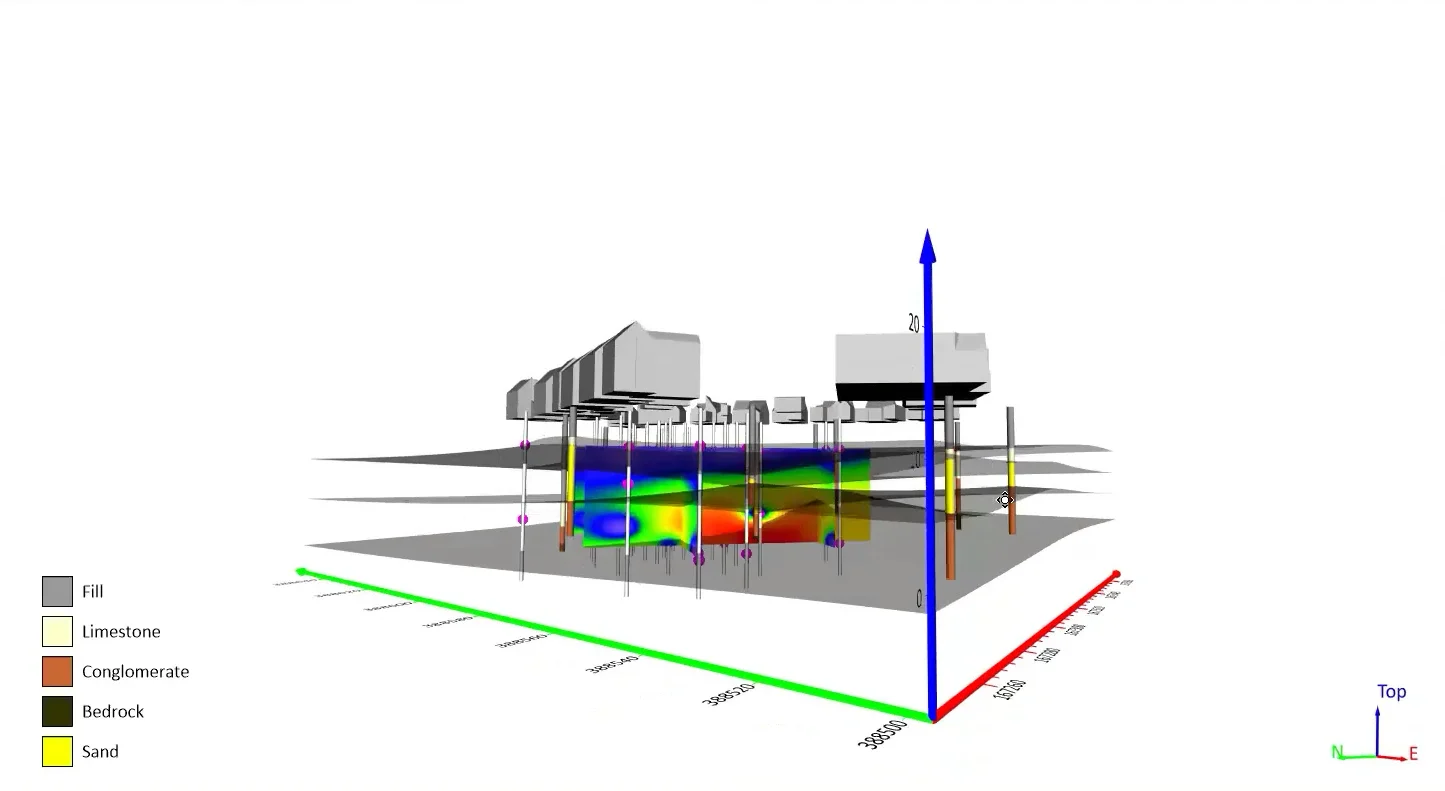
If you’re ready to move your work to Surfer, we’ve put together step-by-step videos that walk through exactly how to convert your Voxler files into a Surfer format. Whether you’re starting with 3D drillholes, a volume render, or a more complex visualization, these video will show you how to bring your existing work into Surfer so you can take full advantage of its improved tools, performance, and visual quality. The first video focuses on creating 3D grids and slices in Surfer (including the new Grid Filters feature, currently available in Surfer Beta), while the second video walks through creating drillholes and transects in Surfer.
Don’t Let Old Files Hold You Back
Voxler served its purpose, but Surfer is where your 3D data belongs now. With its improved stability, enhanced visualization quality, intuitive interface, and ongoing development, Surfer’s a major upgrade. So, if you’re still holding onto legacy Voxler files, now’s the time to make the switch. Whether you’re visualizing subsurface contamination, modeling drillholes, or simply exploring your data in 3D, Surfer will give you the clarity and control that your projects demand.
Which Surfer feature are you most excited to start using after making the switch from Voxler? Tell us in the comments!
2 Comments
Leave A Comment
Recent Articles
- Oct 28, 2026|Gabbie Rhodes|8 min
For our 2026 All Hands Meeting, our team gathered in Colorado for a few days of workshops, customer conversations, and fun activities.
- Oct 21, 2026|Gabbie Rhodes|7 min
Want your subsurface data to tell a clear story to stakeholders? Learn how to visualize it in 2D and 3D so your data clearly shares key insights.
- Oct 21, 2026|Gabbie Rhodes|10 min
With climate change data, you need to visualize where temperature, precipitation, and other variables occur and change over time. Learn how.
- Oct 14, 2026|Gabbie Rhodes|7 min
Mineral exploration requires you to analyze multiple variables. To do that successfully, you need to rely on both maps and graphs.


Dear Drew,
Thank you very much for the news of converting Voxler files into Surfer, which is indeed very useful.
We’re so glad you’re excited about this update, Alecos! Don’t hesitate to reach out if you need anything when it comes to converting your Voxler files to Surfer files.