7 Bar Chart Examples for Real-World Projects

Bar charts are a foundational and simple tool in data visualization. But while they may seem straightforward, there are many different types of bar charts you can use, and choosing the right one isn’t always obvious.
Should you create a grouped or stacked bar chart? Vertical or horizontal? A simple category comparison or something more layered? The structure you choose directly impacts how clearly your audience understands the data. That’s where having strong bar chart examples becomes invaluable.
Bar Chart Examples That Inspire Clearer Visualizations
Seeing different bar chart examples gives you a reference point for what’s possible and helps you match your dataset to the right chart type. Below are seven practical examples with real-world applications. For each one, we explain the purpose, common industry applications, and how you can apply the bar chart to your own work. Without further ado, let’s dive in.
1. Profit Calculator Bar Chart
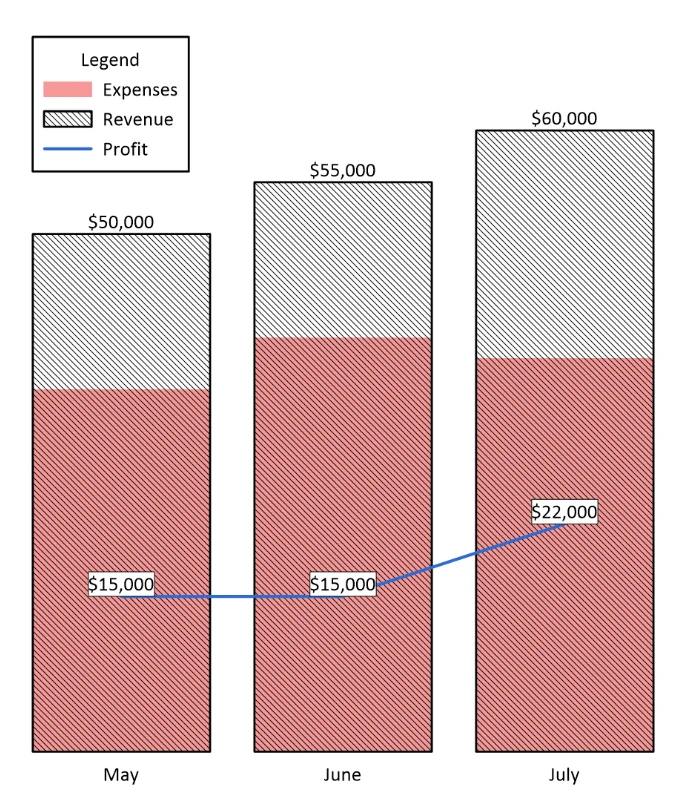
One great example is the Profit Calculator Bar Chart. This visual overlays revenue and expenses within each category, which, in this case, is months. You can visually compare how costs stack up against income. On top of the bar display, a profit value is automatically calculated and plotted as a line, giving you immediate insight into profitability trends over time.
By combining revenue and expense bars with a calculated profit line, this bar chart example clearly illustrates the relationship between income, costs, and net results. Instead of reviewing separate visuals or spreadsheets, you can immediately see whether profits are growing, flattening, or declining.
Common Industry Applications: Asset management, business analysis, economics, finance, and project management.
Graph Elements Used: Bars, lines, and mathematical calculations
Pro Tip: Create this visual using the Profit Calculator Bar Chart Template in the Golden Gallery.
How to Use This Example: You can create this visual when you need to quickly identify which categories generate the strongest returns or where rising costs are impacting profitability. It’s especially helpful for monthly or quarterly reporting, where stakeholders need a fast, visual summary of financial performance without digging into raw numbers.
2. Mining Logs Bar Chart
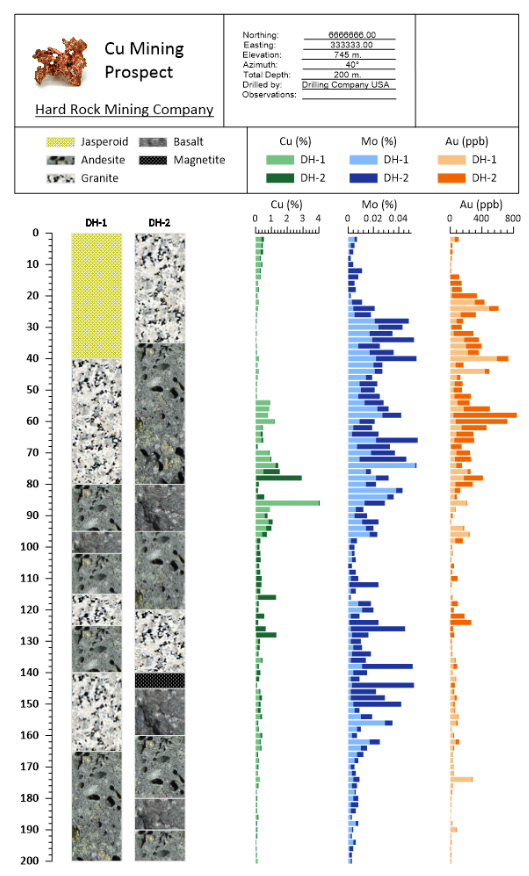
Another powerful bar chart example is this Mining Logs visual, designed to help geoscientists and engineers understand subsurface geology and elemental resources in a structured, report-ready format.
This visualization combines lithology logs with quantitative geochemical data from multiple drillholes. Rock types are displayed using pattern-filled floating bars aligned by depth, while elemental concentrations—such as copper, molybdenum, and gold—are shown as horizontal bar charts positioned alongside the logs. Because everything is aligned vertically by depth, you can immediately correlate lithologic units with changes in elemental concentrations.
In addition to the analytical data, the layout includes a structured frame for common company reporting details, such as drillhole orientation, elevation, and metadata. This makes the chart not only analytical but presentation-ready for stakeholders, technical reviews, and formal exploration reports.
Common Industry Applications: Mining, oil and gas, mineral exploration, and subsurface resource evaluation.
Graph Elements Used: Standard bar charts for elemental concentrations and floating bars for lithology intervals.
Pro Tip: Create this visual using the Mining Logs Template in the Golden Gallery.
How to Use This Example: Use this chart when you need to visually connect rock type with quantitative geochemical data across one or more boreholes. It is especially valuable in exploration reporting, core logging summaries, and technical presentations where decision-makers need to quickly see how mineralization varies with depth and lithology.
3. Annual Wind Study
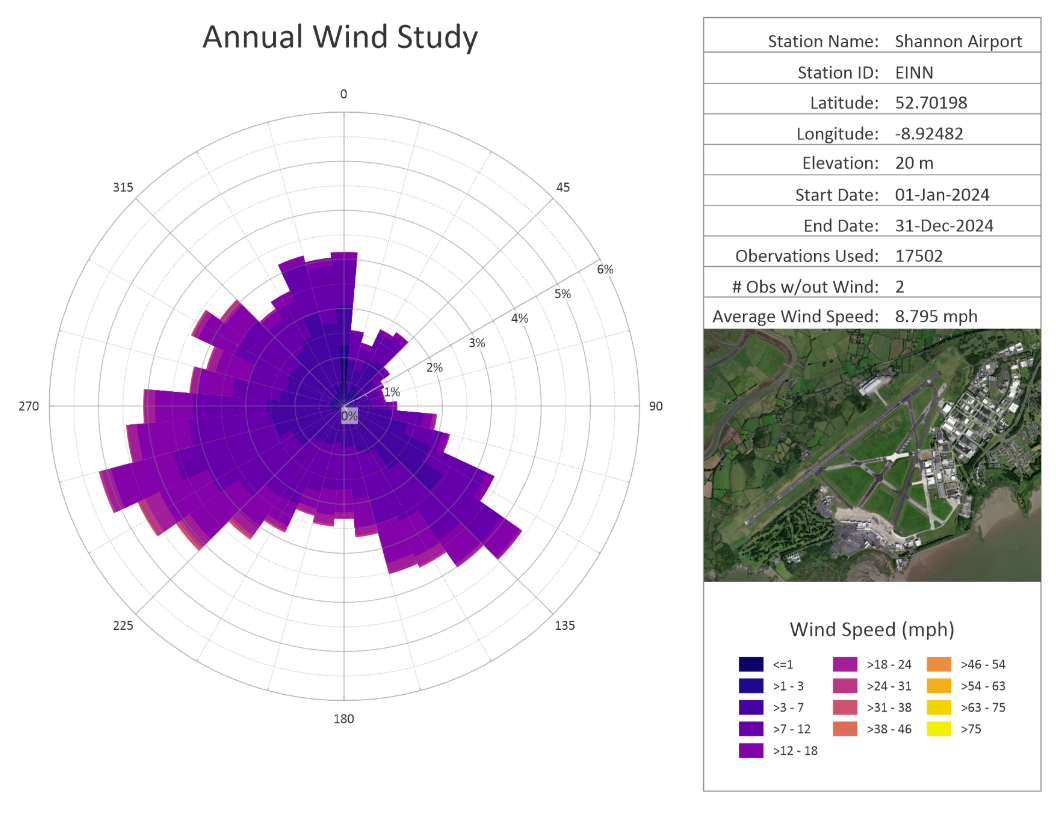
One of the most powerful bar chart examples is the Annual Wind Study, a specialized polar bar chart used to summarize wind speed and direction over a defined period of time.
In this Annual Wind Study example, each spoke radiating from the center represents the frequency of wind blowing from a specific direction. The length of each segment shows how often the wind came from that direction, while the color bands represent different wind speed categories. This layered structure equips you to quickly identify not only prevailing wind directions, but also the intensity distribution within each directional sector.
What makes this example especially strong is the structured reporting layout surrounding the visualization. It includes metadata fields like the following:
- Station metadata (name, ID, latitude, longitude, elevation)
- Date range of observations
- Total observations used
- Average wind speed
- An optional site image for geographic context
This combination transforms the wind rose from a simple chart into a publication-ready reporting asset. It provides both analytical insight and contextual clarity in a single visual.
Common Industry Applications: Meteorology, climatology, environmental science, aviation, civil engineering, and renewable energy planning.
Graph Elements Used: Polar bar elements, rose layout, directional binning, categorized wind speed ranges, and structured frame reporting.
Pro Tip: Create this visual using the Annual Wind Study Template in the Golden Gallery.
How to Use This Example: This chart is helpful when you need to compare wind conditions across months, years, or sites—especially when long-term directional patterns matter. It’s ideal for environmental impact reporting, aviation safety assessments, and renewable energy feasibility studies.
4. Hydrograph Bar Chart
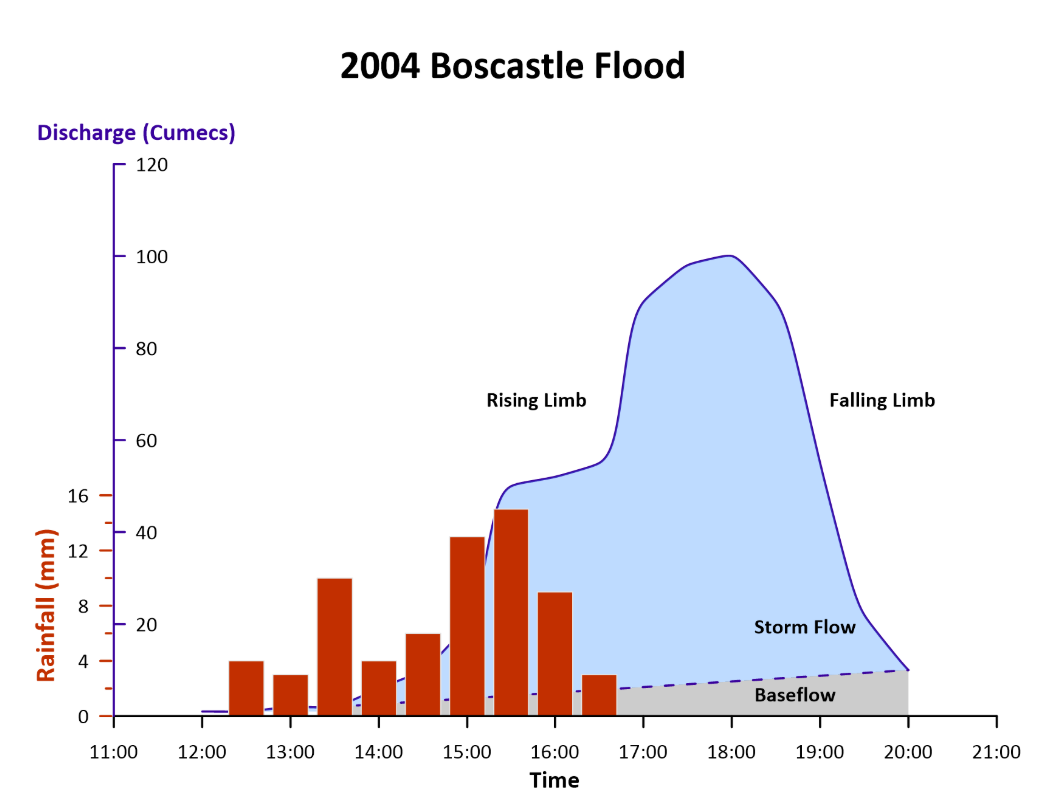
A highly practical bar chart example is the Hydrograph Bar Chart, which combines rainfall and stream discharge data to show how one variable responds to another over time.
In this example, rainfall is displayed as vertical bars, while stream discharge is shown as a filled line beneath it. By layering both datasets on a shared time axis, the chart clearly illustrates how precipitation influenced streamflow during the 2004 Boscastle flood event. You can easily identify the rising limb, peak discharge, and falling limb of the flood hydrograph along with the time lag between rainfall intensity and runoff response.
This combined structure is powerful because it reveals cause-and-effect relationships visually. Instead of analyzing rainfall and discharge in separate charts, you can immediately see how the storm event triggered streamflow changes, how quickly discharge rose, and how long it took to return toward baseflow conditions.
Common Industry Applications: Civil engineering, hydrogeology, hydrology, and water resource management.
Graph Elements Used: Vertical bars for rainfall, line and filled area for discharge, and shared time axis.
Pro Tip: Create this visual using the Hydrograph Template in the Golden Gallery.
How to Use This Example: Create this visual when you need to show how one event triggers a response over time. While it’s widely applied in hydrology, the same structure works well for scenarios such as traffic volume after a major event, energy demand during extreme weather, or system load following a policy change. Anytime a stimulus-response relationship exists, this bar-and-line combination helps make the timing and magnitude of that relationship clear.
5. Annual Mean Temperature Bar Chart
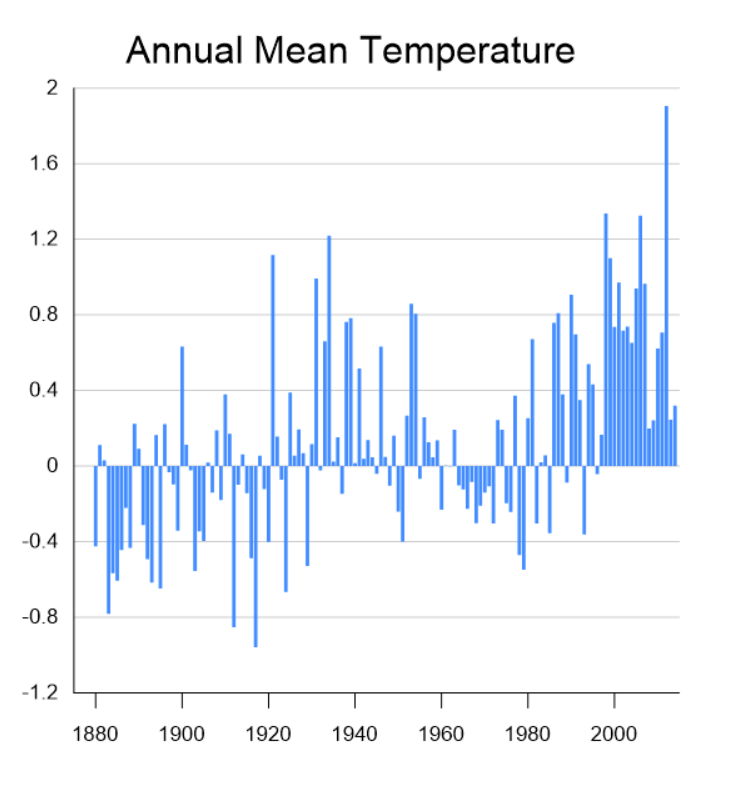
The Annual Mean Temperature Bar Chart visualizes how each year’s mean air temperature deviates from a long-term baseline average. In this example, each vertical bar represents a single year. Bars extending above zero indicate warmer-than-average years, while bars below zero represent cooler-than-average years. By anchoring the chart around a zero baseline, the visualization emphasizes deviation rather than raw temperature values. This structure makes it easier to see patterns of change over time and identify long-term warming or cooling trends at a glance.
Unlike a simple line graph, the bar format reinforces the magnitude of each year’s anomaly individually. The contrast between positive and negative bars helps you quickly understand not only the direction of change, but also the variability from year to year. Over time, the clustering of positive bars makes the broader warming trend visually unmistakable.
Common Industry Applications: Agriculture, climate science, environmental science, and education.
Graph Elements Used: Vertical bars centered on a baseline value
Pro Tip: Create this visual using the Annual Mean Temperature Template in the Golden Gallery.
How to Use This Example: This chart is great when you need to highlight changes relative to a reference value rather than absolute totals. It works especially well when comparing performance against a benchmark, showing deviations from a target, or emphasizing fluctuation around a long-term mean.
6. Category Bar Chart
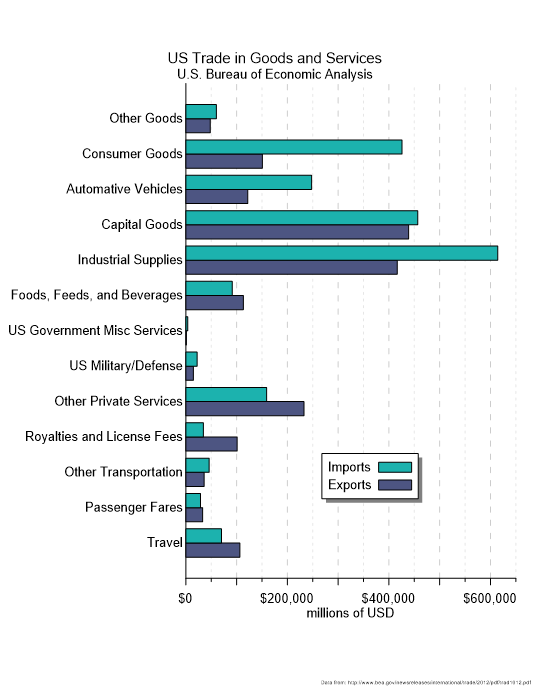
Practical and simple, this Category Bar Chart is designed to compare values across multiple discrete categories in a clear, side-by-side format. As one of the more straightforward bar chart examples, this visual has horizontal bars to represent different trade categories, while two color-coded bars per category distinguish between imports and exports. By aligning both values along the same axis, the chart makes it easy to compare magnitude differences within each category and quickly identify trade imbalances.
The horizontal orientation improves readability, especially when category labels are long or numerous. Instead of compressing text along the bottom axis, this format puts each category along the vertical axis, ensuring the chart remains clean and easy to scan.
In the example shown, you can immediately see which sectors dominate total trade volume and where imports significantly exceed exports. The consistent scale across all categories ensures accurate visual comparison.
Common Industry Applications: Economics, finance, public policy, business analysis, operations reporting, and supply chain management.
Graph Elements Used: Horizontal bars, grouped bar comparison, dual color coding, and shared numeric axis.
Pro Tip: Create this visual by accessing the Category Bar Chart Template in the Golden Gallery.
How to Use This Example: Use a category bar chart when your goal is straightforward comparisons across labeled groups. It works particularly well for financial summaries, departmental performance metrics, product category sales, resource allocation comparisons, or any scenario where two related measures need to be evaluated side by side.
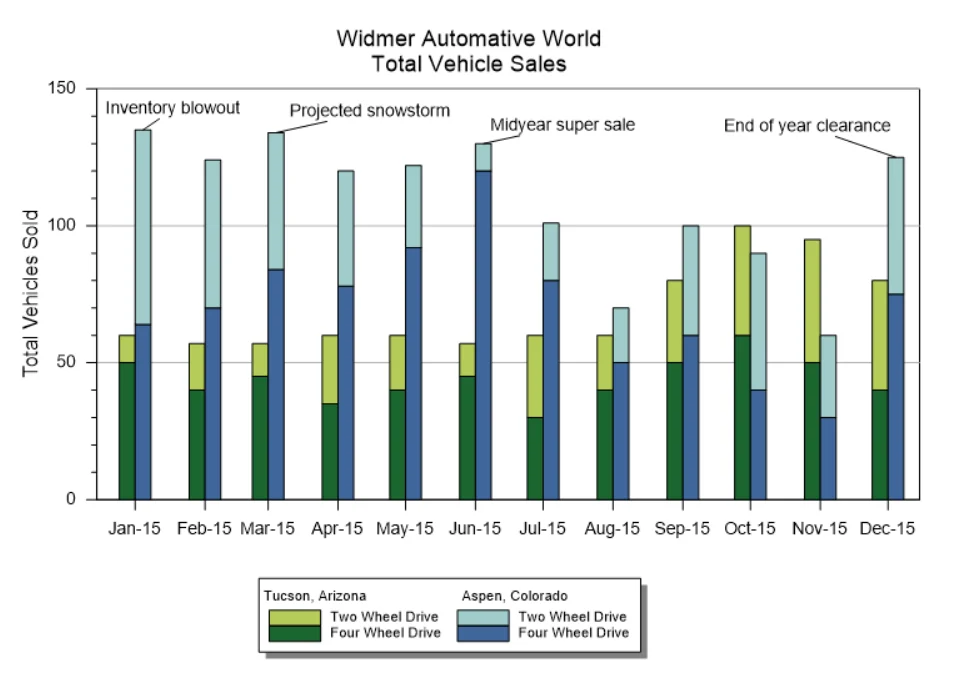
7. Stacked and Adjacent Bar Chart
The Stacked and Adjacent Bar Chart is another powerful example, as it combines two comparison techniques into one cohesive visual. In this bar chart example, vehicle sales are displayed by month, location, and drive type. Each month includes two adjacent bars: one for Tucson, Arizona, and one for Aspen, Colorado. Within each of those bars, the totals are stacked to show two-wheel drive and four-wheel drive sales. This dual structure empowers you to compare both overall totals and category breakdowns simultaneously.
The adjacent grouping also makes it easy to compare total sales between locations for each month. At the same time, the stacked segments reveal how each location’s sales are distributed between drive types. Instead of choosing between “total comparison” and “category breakdown,” this format delivers both insights at once.
In the example shown, annotations such as “Inventory blowout,” “Projected snowstorm,” and “Midyear super sale” provide context for noticeable increases or shifts in sales. This reinforces how bar chart examples can combine structure and storytelling to explain why trends occur and not just what changed.
Common Industry Applications: Retail sales reporting, operations analysis, regional performance comparison, product mix evaluation, and financial summaries.
Graph Elements Used: Adjacent bars, stacked segments, color differentiation, and event annotations.
Pro Tip: Create this visual by accessing the Stacked and Adjacent Bar Chart Template in the Golden Gallery.
How to Use This Example: You should create a stacked and adjacent bar chart when you want to show both comparison and composition in a single view. It’s particularly effective for monthly sales reports, regional comparisons, budget allocations by department, or any situation where stakeholders need to understand both total performance and internal breakdown at the same time.
Choosing the Right Bar Chart With Confidence
Bar charts may seem like one of the most straightforward tools in data visualization, but as our examples demonstrate, they aren’t one-size-fits-all solutions. The structure you choose—whether adjacent, stacked, horizontal, or layered with lines—directly influences how clearly your audience interprets the story behind your data.
To determine the best chart type for your findings, use bar chart examples as reference points to remove uncertainty from the decision-making process. With the right guidance, you’ll pick a chart that transforms raw numbers into meaningful insights.
Need more examples of great data visualization? Subscribe to our blog Golden Discoveries so you never miss an article!
Recent Articles
- Sep 23, 2026|Gabbie Rhodes|8 min
The best 3D data visualizations depend on the quality of your underlying grid. To achieve a great result, sometimes you need to use 3D grid filters.
- Sep 23, 2026|Gabbie Rhodes|11 min
When you're working with complex data, you need to communicate clearly. Graphs can help, especially when you follow design best practices.
- Sep 16, 2026|Gabbie Rhodes|7 min
The latest Surfer release delivers smarter 3D modeling, cleaner maps, and faster workflows. Unlock these benefits by discovering the top features.
- Sep 9, 2026|Gabbie Rhodes|4 min
Explore how Submara Survey bridged the gap between terrestrial elevation data and underwater bathymetry to guide costal development in Norway.